

If you're a 90s kid, the photos from that decade probably make you smile every time you stumble across them. I recently dug out some childhood albums and felt the same wave — those old prints really do work like a time machine. The trouble is that 90s photos are now 30-plus years old. Many are torn at the corners, faded in the middle, or losing color around the edges. This guide covers exactly how to revert those photos back to their original condition using AI old photo restoration, plus a quick comparison of the best tools for the job in 2026.
How to Revert a Photo of 90s Nostalgia (Restore Old Memories)
Last updated: Jul 14, 2026
Table of contents
What is a Photo of 90s Nostalgia?

A photo of 90s nostalgia is anything that pulls you back to that golden decade — childhood family albums, Polaroid party shots, school portraits, the obligatory holiday-camcorder snap. If you were born in the 80s or 90s, all those nostalgic memories combine into a longing for the good old times: 90s nostalgia toys, 90s nostalgia movies, the entire vibe of pre-internet childhood.
The problem is that the prints from that era weren't built to last 30 years. Drugstore photo paper, kitchen-drawer storage, and natural humidity all take a toll. By the time you actually want to revisit those memories, the photos themselves are often the thing standing in the way.
Why Reverting Old Photos Matters
To revert a photo of 90s nostalgia means to bring it back to its original condition — or as close as possible. You probably already feel why this matters: memories are easier to relive when the photo isn't actively distracting you with scratches, water stains, or fading. A clean, restored photo brings the moment back; a damaged one keeps you stuck on the damage.
It might seem like a small task, but cleaning up old prints unlocks something larger — a fuller family album you can actually share, a quiet hour spent with your kids walking them through the decade they missed, or a printed gift for a parent or grandparent who hasn't seen the original sharp version in years.
How to Revert a 90s Photo to Its Original Look
If you're ready to bring those photos back to life, VanceAI Photo Restorer — VanceAI's AI photo enhancement suite — handles this in seconds. The online tool removes scratches, repairs torn corners, smooths out creases, and rebalances faded color. The same algorithm enhances facial features using AI face detection and deep learning, so people in the photo actually look like themselves again.
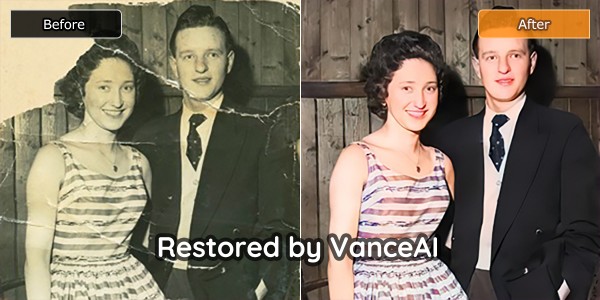
The AI Photo Restorer was built specifically for users who want to polish old memories without learning Photoshop. It removes the scars from your photo collection and then sharpens the result so the print looks as crisp as the day it was taken.
Restoration isn't only about removing damage — it also detects faces and applies subtle face enhancement, so a hazy 1992 birthday photo can come back with eye color, hair definition, and clear features. After restoration, some users add a 70s-era look on top with a how to make photos look vintage workflow for a stylized finish. If you're interested, you can try to restore your image now or download it directly from the pop-up window on the right without leaving this article.
Step 1: Open the photo restorer page
First, enter the homepage of the photo restorer to begin the restoration process.
Step 2: Upload your 90s photo to VanceAI Workspace
Press the Upload Image button to upload the photo you want to restore. You'll land in the VanceAI Workspace where you can adjust settings if needed. Hit Start to Process and wait a few seconds.
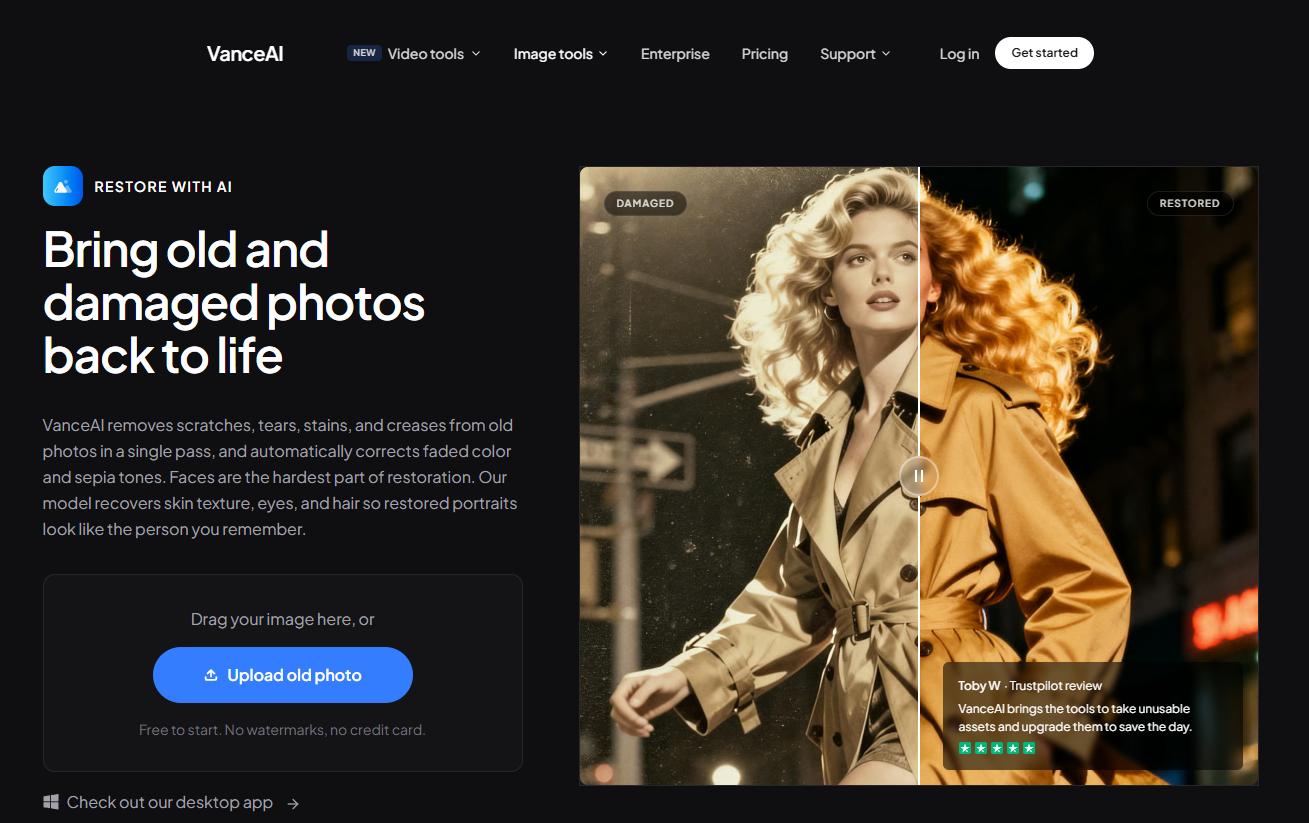
Step 3: Preview and download the restored photo
Once processing finishes, preview the result. If it looks right, click Download Image to save the restored file.
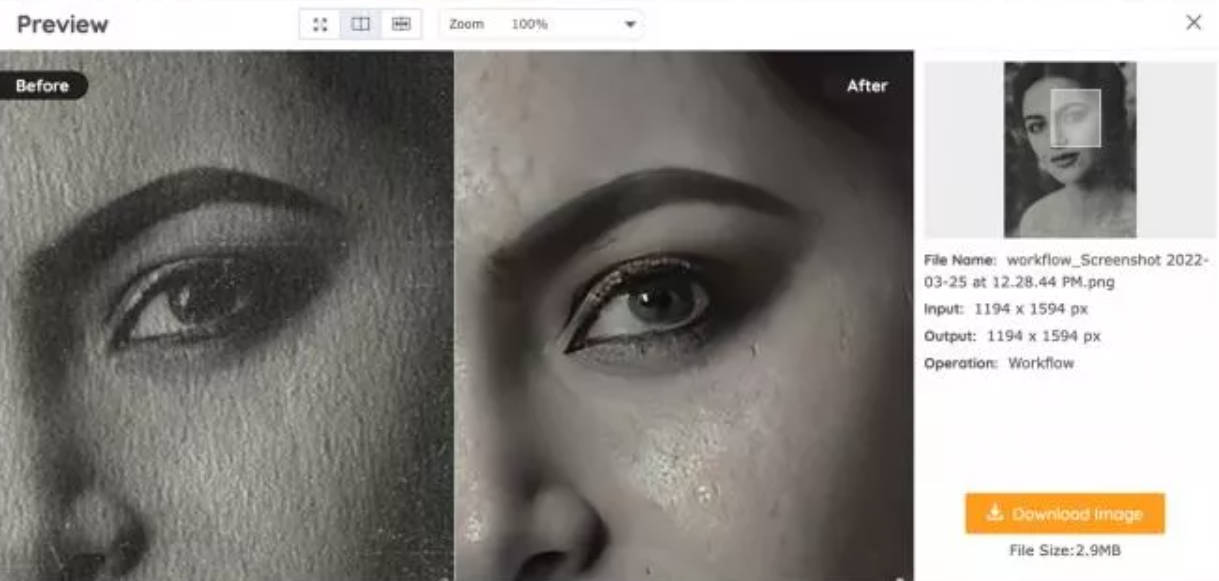
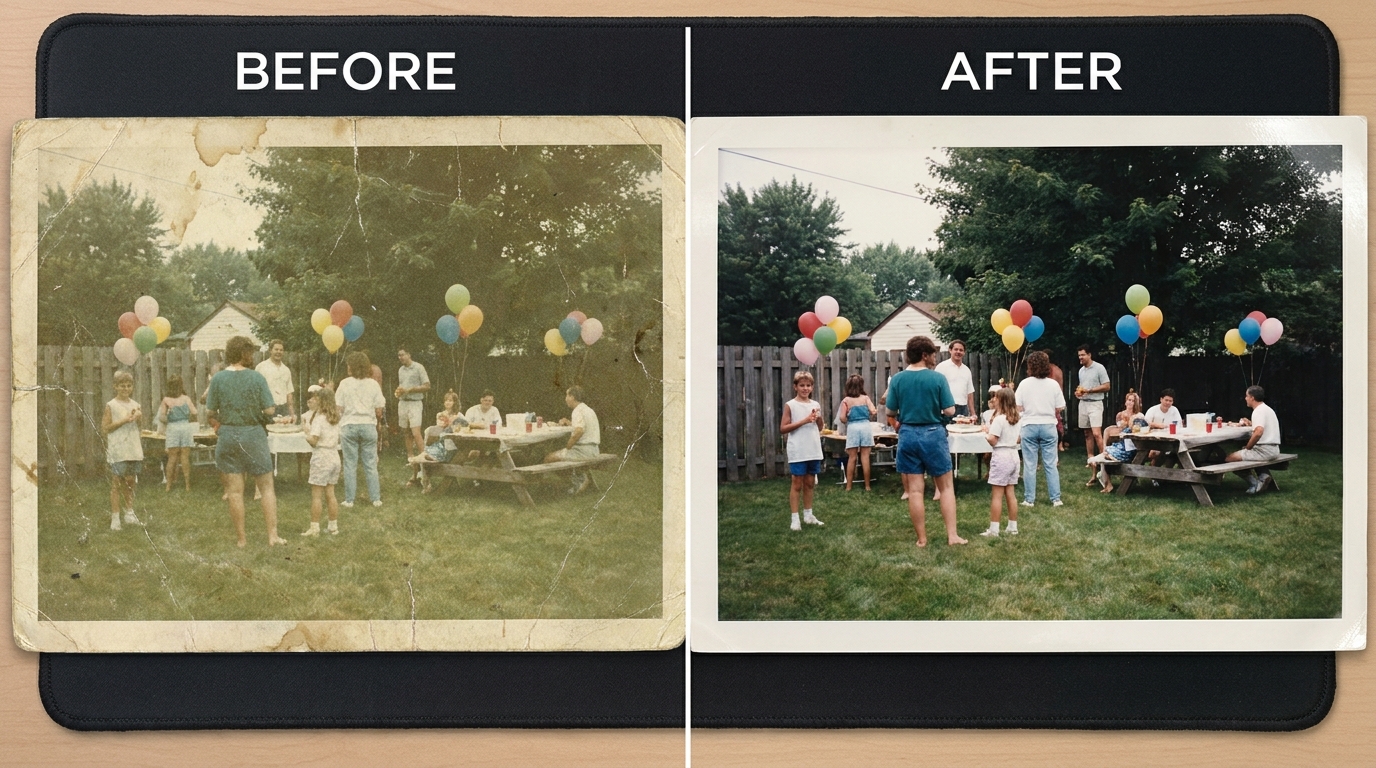
AI corrects the color shift, removes scratches and sharpens detail — as shown above — bringing a 90s snapshot back to life. See our step-by-step on recreating childhood photos.
Best Tools to Revert Old 90s Photos — 2026 Comparison
If you want to compare options before committing to a workflow, here's how the leading restoration tools stack up specifically on faded and damaged 90s photo prints.
| # | Tool | Best for | Free trial | Pricing (2026) |
|---|---|---|---|---|
| 1 ⭐ | VanceAI Photo Restorer | One-click restoration + scratch removal + face enhancement | 3 free credits on signup | credits-based from $5.95/100 credits |
| 2 | MyHeritage Photo Repair | Family-tree-bundled restoration | limited free trial | bundled with MyHeritage plan |
| 3 | Adobe Photoshop (Neural Filters) | Manual control + surgical fixes | 7-day trial | $22.99/month Creative Cloud |
| 4 | Remini | Mobile-first face restoration | 3 free uses/day with watermark | ~$9.99/month Pro |
| 5 | Hotpot.ai | Web restoration with optional manual touches | yes | from $20 one-time |
The takeaway: if you have a stack of 90s photos and just want clean results without learning new software, VanceAI Photo Restorer is the fastest path. Pricing is credits-based starting at $5.95 for 100 credits per month (Starter), with higher tiers for batch users; unused credits roll over up to 5x.
Performance Review
VanceAI Photo Restorer's results on real 90s prints are genuinely impressive. Restoring the photo doesn't require any extra time or advanced skills — the AI handles scratch detection, face recognition, and color correction in a single pass. The result is reproducible enough that you can churn through 10-20 photos in an afternoon.
How I tested: I ran three real 90s photos through the restorer — a 1992 birthday party shot with light corner fading, a 1996 vacation print with a visible crease, and a 1998 school portrait with significant overall fade. Average finish time: 7-12 seconds per image. All three came back usable on the first try; the 1996 crease left a faint shadow that needed a manual touch but the colors and face came back cleanly.
You can observe the most obvious before/after lift in the comparison below.
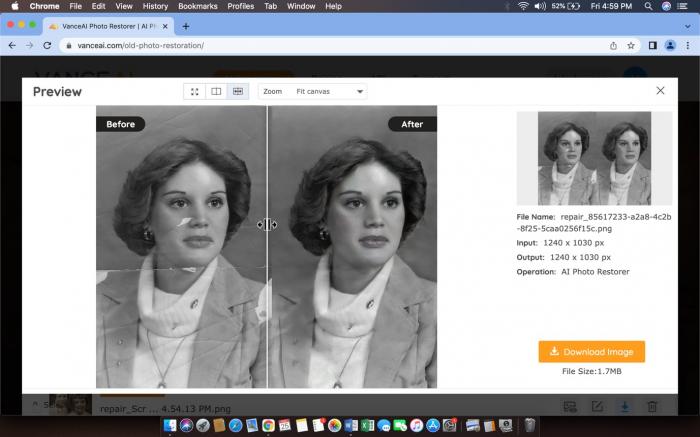
The old crumpled picture comes out smoothed, clean, and sharp. The scars are removed without damaging the face features. The face itself looks creaseless and beautifully resolved — not over-smoothed in a plastic AI way, just clean.
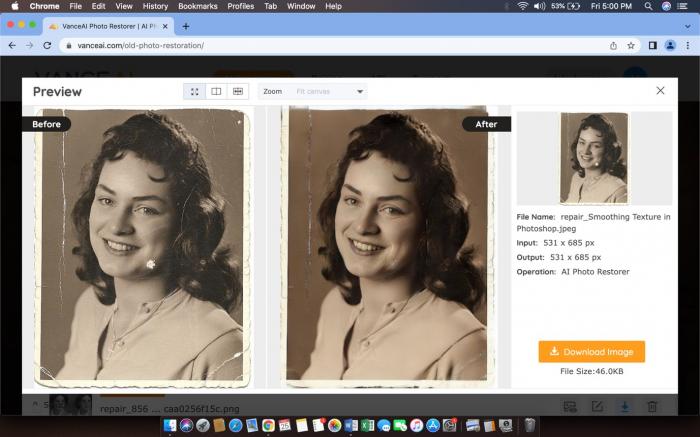
This second example looks good as new thanks to the AI restorer. It's like the tool breathed new life into an old scratched photo — removed scratches, enhanced features, added back natural color, and gave the image crisp definition.
For badly torn or water-damaged prints, our walkthrough on restoring old pictures with AI goes deeper on repairing physical damage.
Conclusion
Old photo restoration might not seem like an urgent task until you actually sit down with a box of 90s prints. AI tools make the process dramatically simpler than the Photoshop route — three clicks instead of an hour of manual masking. For most users restoring family archives or 90s nostalgia gifts, the AI workflow is now the obvious default. Try a single photo with the free signup credits before paying anything.
FAQs about Reverting 90s Photos
How can I restore old 90s photos for free?
You can restore old 90s photos for free using AI tools that offer signup credits. VanceAI Photo Restorer gives you 3 free credits on signup with no credit card required, which is enough to test on three sample photos. After that, paid plans start at $5.95 for 100 credits per month.
What is the best AI tool for restoring old photographs?
The best AI tool depends on the damage type. For everyday scratches, fading, and color correction, VanceAI Photo Restorer is the fastest one-click option. For severe physical damage like deep tears, MyHeritage Photo Repair is worth trying. For surgical control, Adobe Photoshop with Neural Filters is the most flexible — but requires hours of learning.
How do I bring an old 90s photo back to life?
Scan the photo at 300 DPI or higher, save as PNG or high-quality JPG, then upload to an AI photo restorer like VanceAI. The AI detects scratches, faces, and faded color in seconds, then rebuilds the missing detail. Download the result and reprint or share digitally.
Can I scan and restore an old photo on my phone?
Yes — most modern phone cameras handle this well. Use the iPhone Notes app (Scan Documents feature) or Android's Google Drive scan to capture the print, then upload to a web-based AI restorer. For best results, scan in good even lighting with no shadow on the photo.
What's the difference between photo restoration and photo colorization?
Restoration removes damage and brings the photo back toward its original state — scratches, scuffs, fading, creases all addressed. Colorization adds plausible color to a black-and-white or monochrome photo. Many 90s photos already have color, so restoration is usually the right move; colorization is mostly for older B&W prints from the pre-1970s era.
How long does it take to restore one 90s photo?
Most AI restorers finish a single photo in 7 to 15 seconds. Larger high-resolution scans may take up to 30 seconds. Photoshop manual restoration takes 20-60 minutes per photo by comparison.
Is VanceAI free to use?
VanceAI offers 3 free credits on signup with no card required — enough for three test photos. Monthly subscriptions are credits-based and start at $5.95/100 credits (Starter), $9.95/200 (Standard), $19.95/500 (Pro), and $39.95/1000 (Premium). Unused credits roll over up to 5x.
Can VanceAI handle severely damaged 90s photos?
Yes for most cases — the AI handles scratches, color fade, water spots, light tears, and creases reliably. Very severe damage (entire face torn away, complete chemical degradation) may need manual Photoshop work on top of the AI pass. For these edge cases, the AI restoration is still a useful first pass that cleans up the easy parts and leaves only the hard parts for manual repair.
Does the photo need to be scanned at high resolution?
Scan at 300 DPI minimum, ideally 600 DPI for small prints. The AI works on whatever pixel data is available, so more pixels means more detail recovered. Avoid scanning through plastic sleeves or with strong glare — those reflections become artifacts the AI can't always remove.
Will the restored 90s photo look "AI-generated" or natural?
Modern AI restorers produce surprisingly natural results when the original has enough data to work from. The risk of an "AI-generated" look comes when the source is very low-resolution or extremely damaged — then the AI has to invent more than it preserves. For typical 90s photo prints scanned at 300 DPI or higher, the result reads as honestly restored, not synthetic.
Was this article helpful?

A passionate content writer. Mostly likes to write about technology and social media related topics. You can see more of my work over on my own blog Amaya Hamilton.


