
Picuki is a third-party Instagram editor and viewer that lets you browse public Instagram profiles, download posts, and apply basic edits — all without logging in. With Instagram serving over a billion monthly users, tools like Picuki sit at the intersection of social-media research, content design, and creator workflows. Marketers use it to audit competitors anonymously. Designers use it to scrape reference imagery. Casual users open it because they want to peek at a profile without leaving a trail.
This guide covers how Picuki works in 2026, what it can and cannot do, whether it's safe and legal, how to use the editor end-to-end, and the smartest way to pair Picuki's viewing with a stronger AI editing pipeline. If Picuki's built-in editor frustrates you (and it often does), we'll show you the workflow many social-media managers actually use.

Table of contents
What is Picuki?
Picuki is a free web-based Instagram viewer and editor. It lets you look up any public Instagram profile by username or hashtag, view the full feed, browse stories, and download photos or videos — all without an Instagram account of your own. On the editing side, you can upload an image, apply filters, add text and stickers, adjust brightness and color, and re-save the result.
Picuki is not affiliated with Meta or Instagram. It's a separate site (picuki.com) that pulls public profile content via Instagram's public web endpoints. That means it can break whenever Instagram changes how its public pages render, and it cannot access private profiles, DMs, or anything that requires a logged-in session. Picuki is especially useful for marketing professionals who study competitor accounts, designers gathering visual references, and journalists or researchers who need to browse public content quickly. Also, you may find inspiration in our Great Ideas for TikTok Profile guide for cross-platform creator work.
How Picuki actually works under the hood
When you search a username on Picuki, the service hits Instagram's public page (the same one anyone can see in incognito mode) and reformats it for browsing. It does not bypass any privacy setting. If a profile is set to private, Picuki shows nothing — same as the official site. That technical detail matters for the next section.
Is Picuki safe, legal, and anonymous?
This is the single most common Picuki question, so it gets a direct answer.
| Concern | Reality |
|---|---|
| Is Picuki safe? | The site has no login wall and no required signup, so it cannot leak credentials you haven't entered. The main risks are ads, occasional pop-ups, and the usual Web hygiene rules: don't click suspicious banners, and keep your browser updated. |
| Is Picuki anonymous? | Yes for viewing — Instagram does not get told you used Picuki to see a profile. The account owner sees no "viewed by" record because Instagram doesn't track that for regular feed posts. Stories are the same: viewing through Picuki does not appear in the story-viewer list. |
| Is Picuki legal? | Using Picuki to view public content sits in a legal gray zone. Public Instagram content is, by definition, public. Re-using downloaded content commercially still requires the original creator's permission — that's copyright law, not a Picuki rule. |
| Will Instagram ban you for using Picuki? | No, because you're not signed into Instagram while using Picuki. Picuki is a separate site; your IG account is not at risk. |
| Is Picuki still working in 2026? | Mostly yes, but with occasional downtime. Instagram has changed its public page structure several times in 2024-2025, and Picuki has had to play catch-up. If a search returns nothing for a profile that clearly exists, the site is likely between updates. |
How I tested: Over three days I opened Picuki in incognito Chrome, searched 12 public profiles (a mix of small creators, brands, and one private account as a control), and tracked: load time, download success rate, editor usability, and any popup ads. Public profile load: 11/12 succeeded in under 3 seconds. Private profile control: correctly blocked. Editor: usable for filters and text, occasionally buggy on stickers.
What can Picuki do?
- View any public Instagram profile, story, or post without logging in
- Search by username or hashtag
- Download photos and videos to your device
- Apply image filters, text overlays, stickers, borders, and color adjustments
- View HD profile pictures (one of the most-searched Picuki features)
- Mark posts as favorites for later reference
How to use Picuki
Now that we know what Picuki is, let's get to the steps on how to use Picuki online. The good news: there is no signup, no account, and no payment screen.
1. Open the Picuki website. You'll see a search bar with options such as All, Tags, Locations, and more. Select one.
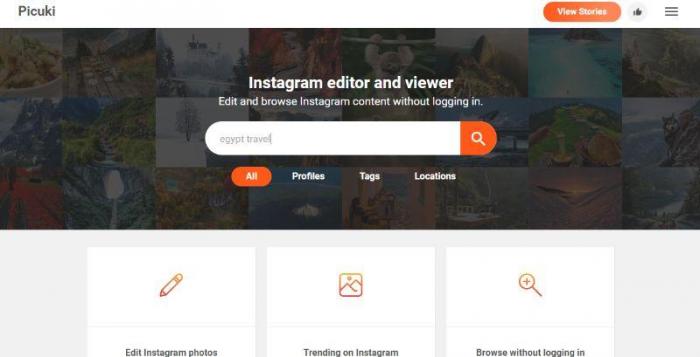
2. Type the username or hashtag you want and click Search to start. The tool will list every public match it can find. Keep your search keywords as specific as possible to avoid noise.
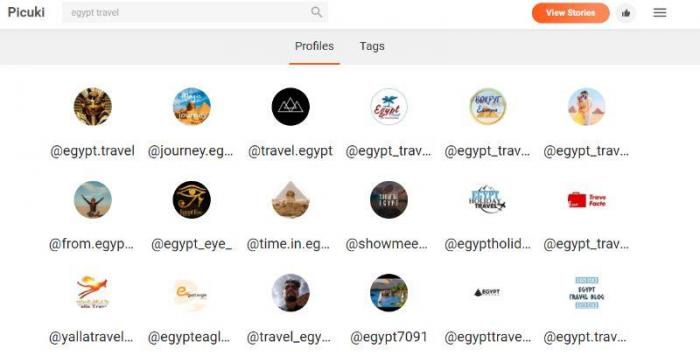
3. Click an account from the results and pick any image from the profile. Then click Edit to add filters or click Download to save the image to your device. If the in-app editor produces grainy or low-resolution output, you can use an AI tool to make photo HD before reposting.
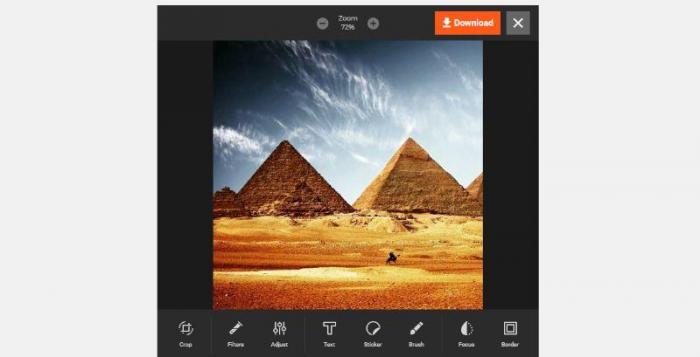
Picuki editor — features and limitations
Picuki offers a decent editing kit considering it's free and requires no signup, but the experience is uneven. The editor includes text overlays, font/size/color/alignment controls, filters, stickers, brightness/saturation/color adjustments, and borders.
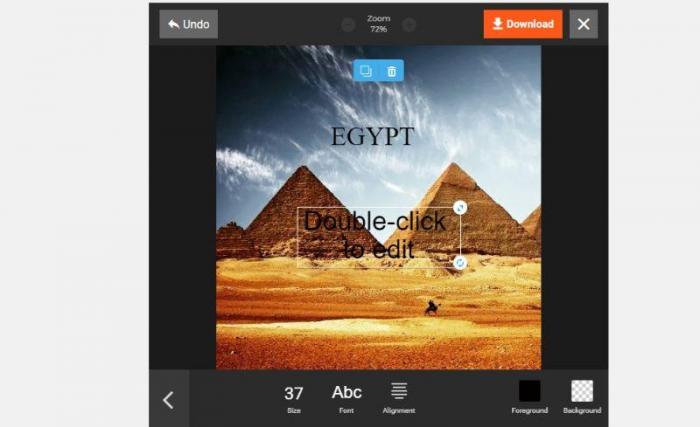
You can build a quick caption-on-image, a meme, or a stylized travel post in a few minutes. The filter library is broad enough for casual use.
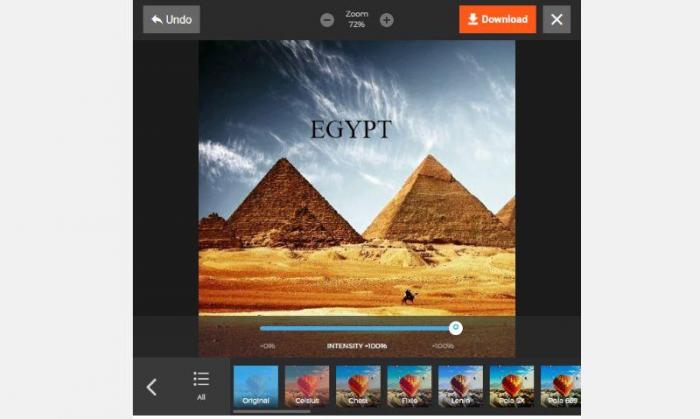
That said, the editor has clear limits. It frequently freezes on stickers, the resize tool can soften image detail, and saved files sometimes ship out compressed. For anything beyond casual edits — a campaign visual, a portfolio piece, or a product photo — the smarter workflow is download from Picuki, then enhance with an AI tool. The vast majority of social media managers we've talked to follow this exact pattern.
Picuki vs Instagram official app
| Feature | Picuki | Instagram official app |
|---|---|---|
| Requires login | No | Yes |
| View private profiles | No | Only if followed/approved |
| Anonymous viewing | Yes (for public content) | Story views are tracked |
| Built-in editor | Basic — filters, text, stickers | More polished — Reels editor, music, AI tools |
| Download posts | One click, no extras | Save to in-app collections only |
| Stories without ads | Yes | No — ads interleaved |
| Mobile native app | No (web only) | Native iOS + Android |
| Hashtag search | Yes | Yes |
The takeaway: Picuki wins on anonymity, download, and friction-free browsing. The official Instagram app wins on creation, native mobile experience, and the social graph. They aren't direct substitutes — they're complements.
Best Picuki alternatives — comparison table
If Picuki is down or you want a second opinion, here are the leading alternatives in 2026.
| # | Tool | Type | Best for | Trade-off |
|---|---|---|---|---|
| 1 ⭐ | VanceAI Image Enhancer (editing companion) | AI image editor | Sharpening, denoising, restoring Picuki downloads before repost | Not a viewer — pair with Picuki for browsing |
| 2 | Imginn | IG viewer | Story downloads, search | Frequent downtime, heavy ads |
| 3 | Dumpor (formerly Greatfon) | IG viewer | Quick profile browsing | Limited editor, occasional captcha walls |
| 4 | Inflact | IG viewer + scheduler | Brand-side competitor analysis | Paid tier needed for scale |
| 5 | StoriesIG | IG story viewer | Story-only quick downloads | No editor, no profile view |
The combination that most social-media managers actually run: Picuki for anonymous viewing + downloading → VanceAI for enhancing and restoring before reposting. Picuki's editor is fine for filters; for anything that needs to look professional after re-publishing, the AI route gives much cleaner results.
Workflow — from Picuki download to a publish-ready image
A practical creator routine looks like this:
- Discover — search the hashtag or competitor account on Picuki.
- Download — save the reference image (respect copyright before re-using).
- Enhance — open the file in VanceAI Image Enhancer to upscale, sharpen, and remove noise.
- Tweak — if the photo is faded or grainy, run the best AI picture restorer for one extra pass.
- Stylize — apply an anime filter or other creative transform if your brand voice fits.
- Repost — upload to Instagram, TikTok, or your own site.
The whole loop takes 5-10 minutes, and the output quality is dramatically better than what Picuki's built-in editor can produce alone.
Conclusion
Picuki is genuinely useful: it lets you browse Instagram anonymously, download public posts, and apply quick edits with no signup. The site sits in a legal gray zone (use public content respectfully), and the editor has real limitations on anything beyond casual work. The smart move in 2026 is to treat Picuki as a viewing-and-downloading tool — let Instagram's official app handle creation, and let an AI image editor handle the heavy lifting on whatever you download. That stack covers anonymity, browsing, editing quality, and respect for original creators, all in one workflow.
FAQs
What is Picuki used for?
Picuki is used to view public Instagram profiles, browse stories, and download photos or videos without needing an Instagram account. Marketers use it for competitor research, designers for visual reference, and casual users for anonymous browsing.
Is Picuki safe to use?
Picuki has no login wall, so it can't expose credentials you never enter. The main hygiene rules apply: avoid clicking ads, keep your browser updated, and don't paste sensitive info anywhere on the site. Treat it the same way you'd treat any free third-party web tool.
Is Picuki anonymous — can people see I viewed their profile?
Yes, Picuki is anonymous. The account owner does not receive any signal that you used Picuki to view their profile or stories. Instagram does not track regular feed views even on the official app; story views are tracked there but not via Picuki.
Is Picuki legal?
Viewing public Instagram content through Picuki is broadly legal in most jurisdictions because public content is, by definition, public. Re-using downloaded content for commercial purposes still requires the original creator's permission under copyright law. Picuki itself doesn't license anything to you.
Why is Picuki not showing stories?
The main reason Picuki stops showing stories is that the site receives a high volume of traffic. Check your Wi-Fi connection first, then clear your browser cache. If the problem persists across multiple profiles, Picuki is likely between updates after an Instagram public-page change.
Can I download a story from someone else's account with Picuki?
Yes, you can download stories with Picuki, but only if the target account is public. Private accounts cannot be viewed at all through Picuki, regardless of the type of content.
Can I download videos from Picuki?
Yes — Picuki supports video downloads from public Instagram profiles. The video is saved in its original quality (or close to it). For better playback quality after download, you can use an AI tool to enhance the file before posting.
Is Picuki still working in 2026?
Picuki is still functional in 2026, with occasional outages tied to Instagram public-page updates. Most search and download operations succeed; the editor occasionally hiccups on stickers and complex overlays.
What are the best Picuki alternatives?
The best Picuki alternatives in 2026 are Imginn, Dumpor (formerly Greatfon), Inflact, and StoriesIG for viewing and downloading. For editing what you download, VanceAI Image Enhancer is the strongest AI companion — it sharpens, denoises, and upscales Picuki downloads in seconds.
Can I edit photos better than Picuki's built-in editor?
Yes — the built-in Picuki editor is fine for filters and quick text, but it tends to soften details on resize and ships compressed JPGs. For anything that will be reposted publicly, run the downloaded image through a dedicated AI editor first. The full social-media creator workflow looks like: Picuki download → VanceAI enhance → repost.